Sunday, June 17, 2018

The Inspired Traveler

Though I've not traveled much in the past couple of years, it has always been in the back of my mind. When can I get away and how can I afford the luxury only select few can afford?

Well, it also hit me that time is very limited and traveling is often used to inspire artists and creatives. I, for one, have been looking for something to kick-start the creative writing that I've been holding off for far too long.

My personal belief is that travel can help to move along the constipated condition that is known as writer's block. Travel can also be used as a motivator, helping you to find the right creative state of mind.

Sometimes it's important for me to remember my priorities when I have so many things going on in my life. Stepping away from the chaos of everyday life helps to re-prioritize your daily tasks and find the time to let your creative energies flow.


In my ever growing struggle to maintain a personal life, juggle several hobbies, produce content, work a 9-to-5 job, and freelance in both video production and writing, several things tend to get lost in the shuffle and priorities constantly shift on a daily basis.

For example, my podcast has a total of nine episodes recorded, only six of which are currently out. Two were recorded back in January, but due to the constant barrage in my ever shifting routine, I had to bench a couple projects while I got a few other things sorted out.

Life as usual.

Anyway, to escape from the constant grind of things, I was able to make a trip to the city of Minneapolis. Originally planned as a trip to see one of my favorite bands play (Closure in Moscow),  we mapped out some fun adventures as we scoped out the city.

This had been the first time that I had gotten away in about three years. In that time, I had forgotten the true importance of getting away.

Certain college and university institutes actually provide the opportunity to study something called Travel Writing. Particularly, Chatham University comes to mind.

When I was applying for graduate programs about six years ago (christ, I'm getting old), I looked into the particular Fiction Writing program that was available through Chatham. It was interesting because it placed an emphasis of moving around to faraway locations and using that experience to help get the juices flowing.

As writers/creators, we are constantly pulling from our real-world experiences to create a world beyond our own. Travelling certainly has its perks, as it gets you away from the daily repetitive grind to show you something new and exciting. We can ultimately expand on ideas with this fresh take on the world around us.

Even just having a "staycation" can help with clearing a cluttered mind, filled with the fragments of our "important business" that we take priority over. How doI benefit from stressing over our short-term accomplishments in our 9-to-5 grind? It comes down to just wasted time and money that has to be thrown away to the rising costs of living.

Of course, we're all wired differently, so maybe my needs are much different from yours. Some people do very well with the time that is given to them, and I always admire that. Unfortunately, I can get drained by the barrage of repetitive work, which is why I find such love for an "escape" every now and then.

If you find yourself in a tough spot creatively, just remember that it's important to step away from the routines of life and explore something new, helping to provide something fresh to bring to the table.

To see more from my trip to Minneapolis, please check out my newly updated photo section on my website (Sorry it's not more organized. It's still a work in progress).

Until next time.

Cheers.
Steven

Monday, March 12, 2018

Behind the camera with Reckless Amnesiac

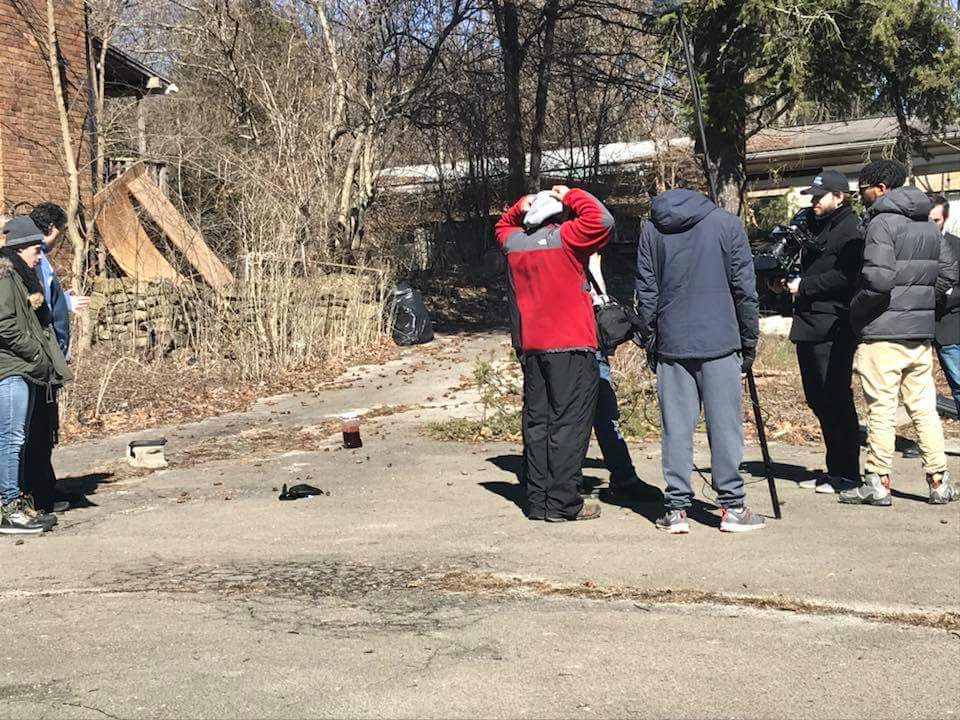
After discussing the next big project by Reckless Amnesiac, I was offered to assist with the first two episodes of the hilarious series known as Hobo Hunters. It was a fantastic experience and I'm always honored to work with the legendary Ian Altenbaugh and Joe Bucci.

SHAMELESS PLUG: For more on the series and the creators, check out the second episode of the Decipher the Media Podcast
Photo credit: Rebekah Lehman

So, I figured it would be a good opportunity to talk about it in my blog. How did it feel to get back behind the camera after wrapping the long-in-development Body Farm? Obviously, great. To work on a comedy series that spoke to my dark sense of humor...well, that's what made this so wonderful.

We shot two episodes in one weekend. Each episode only took up a day of production (about 10 hours). Working with these gentlemen before, I know what to expect. The level of knowledge and professional demeanor of these guys was directly reflected in the quality of the production.

I was lucky enough to be one of the two on camera in a two-camera setup. It gives me a bit of envy when I work with a camera like the Blackmagic. My personal setup throughout Body Farm was a Canon EOS 6D with an L-series zoom lens, so I've always wished for something more. Unfortunately, Blackmagics were always a bit out of my price range, so it's always great to work with one on a production.

Photo credit: Rebekah Lehman

The only difficulty I experienced with this production was the physically demanding aspect of a documentary-style production. Carrying around a rig all day took a lot out of me. My shoulders and arms were extremely sore by the end of the weekend, which is probably a direct reflect of how out-of-shape I am. I guess that's more reason than ever to get back to the gym.

I'm hopeful to have a camera setup like this in the near future. In the meantime, I'm just happy that my background in camera operations still finds a use in the local community of filmmakers.
Photo credit: Rebekah Lehman


The strongest aspect of Hobo Hunters, by far, is the writing. Ian and Joe clearly know how to write something that is both hilarious and socially relevant. Sure, the comedy might not be for everyone, as it pokes fun at topics like religion and cultural stereotypes, but it does so in a way that is relevant to today's bubbling climate. It teaches you that you shouldn't take life too seriously.

It especially speaks volumes to me.Maybe this wasn't the creators' intention, but we, the audience always draw our own interpretation of an artist's work. In this case, that was my interpretation.

Maybe this will finally be the fuel I need to hop back into the world of writing after such a long hiatus. Time, always being my enemy, will tell.

In meantime, I am grateful for being involved in another project from these fine gentlemen. We'll certainly cross paths again soon.

Cheers,
Steven

Photo credit: Rebekah Lehman

Thursday, February 15, 2018

Soap Box: Relationships as professionals and effects on the job

Moving into 2018, I wanted to look back and touch upon some tidbits of knowledge that picked up along the way. It has been a great journey so far and I'm very appreciative of everyone that has come into my life. I have made some strong bonds that I am very proud of. As creatives, it's all about understanding and reaching that common goal that makes it all worthwhile.

We are as strong as our weakest link. I'm sure that's been quoted many times before by many different people. Personally, I heard it a lot when I play sports in high school. Of course, I was never really good at sports, so maybe that quote was directed at me in that respect.

Anyway, the quote reverberates to many aspects of our lives. I think of this quote as I'm writing this because I think back to the many creative productions I've been on and how they've panned out based on every individual's strengths and weaknesses.

I feel my biggest fear is letting down my teammates, no matter what the job may be or how closely I'm involved. Specifically, my roles in film projects come to mind.

There have been times that I have worked myself to exhaustion with moonlighting then came to a film set and felt useless as I struggled from the lack of sleep or energy. So, why did I continue to do this? Because I felt every project was worth it. I felt my crewmates were counting on me to get the job done. Most importantly, I understood that I was a piece of a puzzle.

A puzzle? What good is a puzzle with a missing piece? They each play a part to create something that is much bigger than themselves. And when finished, the results are beautiful and create a larger understanding of the roles of each interlocking piece.

At the point of this photo, I had gone at least
36 hours without sleep.
We, as a crew, interlock to create cohesive matter. At the time, we might not be able to see that. It's not until we witness the finished product that we understand.

In a film production, it can sometimes be hard to see when it matters to work together as a well-oiled machine. I know there are times that my flaws can get in the way of seeing the bigger picture. Nobody is perfect, and it is our duty as human beings to work around our imperfections to achieve a greater goal.

Each position and department on a film set has their own specific set of duties. However, they should never work against each other. It is our job as a crew to create an understanding of the overall goal and how to achieve it. We operate to obtain the same thing.

As I mentioned before, that can be overshadowed by our personal demons. I know there are times that I can be selfish, which can go against the common goal.

As a Director of Photography, I may have a different vision that the Director. Understanding the importance of understanding each other is something I always try to keep in mind. Everyone works differently. It is our job to use our own strengths to build upon our crewmate's strengths.

It feels good when it all comes together. As you all have heard, Body Farm is complete and had a
very successful premiere. I'm very proud of everyone involved and I feel that we all shared a very special bond over the past few years.

I know I can be difficult at certain times because my stubbornness and pride get in the way. For those of you out there who were patient with me, I am forever grateful.

I also know that I'm not the most technically educated in the terms proper set etiquette or techniques. I did not have the opportunity go to a proper film school. In fact, I did not know where I wanted to go with my life until my junior year of undergrad. And I have Juniata College to thank for helping me along the way, even though I only scratched the surface by the time I graduated.

However, I feel that it is important to continue to learn even after our educations have finished. Even without a proper education in professional filmmaking, you will still find me assisting in any capacity on set, making mental notes of how others do their jobs and being observant of how everyone works together. I will then do my best to fill in where needed.

Large egos can sometimes get things done in a production. Conversely, large egos can also create a very toxic environment on set, if one individual places themselves above all else. It is important that we all remain humble and understanding of each others needs in a film production.

Why am I speaking of the importance of teamwork? Because I don't want anyone reading this to make the same mistakes that I have made. I've made a lot of connections over the past few years. But I've also burned some bridges, not realizing until it's too late.

It's inevitable in this industry that we can't always please everyone, but it is important to understand their perspective to help complete a common goal.

I'm very thankful to everyone that I have ever worked with. No matter the size of the project, I appreciate the efforts that are always put forth. You guys are what keep me going.

Wrapping up the last few projects, I wanted to share this clarity and insight with you. As artists, we are a community of like-minded individuals.

We are a family. And I'm so proud of my family. I'm looking forward to growing with you in 2018 and beyond.

Much love, my friends.

Cheers,
Steven

Monday, October 30, 2017

The art of game capture: my 'Let's Play', four years in the making

Since I discovered this form of media existed, I have slowly cultivated the idea to produce something to call my own.

I believe it was around 2013 that I stumbled upon the world of Let's Plays. Although they've likely been around since the availability of capture technology, it really seemed like 2013 was the year that it was becoming mainstream. It was the first time that it garnered my interest.

Sure, YouTube celebrities like PewDiePie and Markiplier were at the forefront of the Let's Play movement, but it was a growing company known as Achievement Hunter that introduced me to Let's Play.

I remember stumbling upon my first Let's Play video. Two men were operating the stiff hands of a ridiculous game called Surgeon Simulator while commentating on their flubs as they attempted do heart surgery. It was absolutely hilarious. Since then, I've been following the Achievement Hunter troupe and taking notes on the technology that they use to create these wonderful videos.
The first iteration of my video game project.
Now, I have no intention of ever making a career out of this. I simply wanted to do this because it combined many aspects of my passions in digital media. Video games? Check. Recording? Yeah. Video editing? Yup. The creative development process behind producing a video? Many of the elements are there. From that point on, I was sold on the idea of creating my own Let's Play channel.

But then life happened. In 2014 and 2015, I was moving around a lot in a whirlwind of work and living. I was also more heavily involved in the filmmaking community, meaning that I had to put this project on the back burner. I hate when I'm forced to do that, but there is only so much time in the day.

Around late 2014, I recorded my first Let's Play test run with my now ex-girlfriend. We played together in a world that we created in Minecraft. It was my first taste on how difficult this process could be. Tensions were high as technology was failing. It was definitely not a success. So, I decided to, once again, put the project on the back burner.

Then more moving happened and more fell on my lap, consuming all my spare time. It was 2016 and I was living in a tiny apartment in Pittsburgh. My budget was tighter than usual, but my passions remained the same. My friend came to me with the idea to start a podcast, being one that never shies away from new opportunity, I agreed to work on back-end of the podcast, handling the hardware and software that would record, edit, and release episodes of the podcast.

I found that my aspects of the process could be incorporated into recording for a Let's Play. Once ,
again, I felt the urge to make a Let's Play. This time, I used the knowledge I had gained from recording a podcast.

I started with something simple. I tried capturing a mobile game off of my phone using software that was already built into into my PC. It's a very simple setup for capturing. At that time, the Miitomo app by Nintendo had just released. This hybrid game/social app was perfect for my experiment. I event tried adding a facecam (webcam recording me while I capture my audio and the screen). The results were satisfying.

Unfortunately, I had to shelve my second attempt before I even got around to editing it. This time, it was for more personal reasons. Life really has a way of throwing some curveballs.
The most recent iteration of my gaming project.
Halfway through 2017, life was finally settling down. Again, I wanted to scratch that itch of recording a Let's Play. On a late Saturday evening, I sat down at my desk and booted up the game 20XX on my PC. Without any script or guidelines, I recorded a playthrough.

I was highly satisfied with the results, though pretty amateurish by nature. My next step was to work on the back end and prepare all of the resources necessary to edit and publish my video. After a lengthy process of trial-and-error, software testing, and workflow testing, I was satisfied with my results.

Here is the final product:


Thanks so much for taking the time to read this and thanks again if you gave the video a watch. There's still a lot to improve on. My philosophy has always been that everything has room for improvement. Feel free to pass along any of your own input. I love constructive criticism.

Until the next time.

Cheers!
Steven

Friday, October 20, 2017

Adobe Premiere Pro: A few efficiency tips, assembling your clips

Today, I'm doing something a little different. I'm creating a guide that is not only something I wanted to share with you, but also as something that I can reference myself.

Recently, I've been jumping back into editing. Although it is something that I love doing, post-production is also something that I can go months without doing. However, with the new wave of projects I'm working on, I'm finally able to jump back into editing software, such as Adobe Premiere Pro and Adobe After Effects.

I've been an Adobe user since I began working with their software back in college. When I began photography as a hobby, I started with the basics in Photoshop and Illustrator. Through that, I was introduced to many of their related programs.

From a video editing perspective, I was "classically trained" in Final Cut Pro. This was when the software was a fantastic and powerful editing too. Not the stripped down Final Cut Pro X that was released a few years later.

However, when I was working from my dorm, I had no access to Final Cut. My solution was to test out the alternatives. I found Adobe Premiere Pro to be a very effective editing tool for the jobs that I needed done.

After graduation, Premiere Pro became my primary tool for video editing. It wasn't until I started diving deeper into local video projects that I was able to heavily utilize this tool. Unfortunately, there came a time that I had to step away from post-production.

Which brings me to my point. When I haven't used certain software in a while, I tend to just forget all of the shortcuts and tricks that make my job a little easier. I've decided to go back and refresh myself on some of the basic shortcuts, not only for me but also for any new or amnesic users.

Let's start with the basics. I'm sure I'll touch base on some more advanced techniques in the future. For now, let's look at the simplest commands and organizational methods associated with assembling video clips in Premiere Pro.

Storyboard those clips:

For any project that requires organizing a variety of clips into a coherent story (through the power of editing), it might be beneficial to separate those clips into a storyboard WITHIN Premiere Pro.

How? Basically, if you look on the bottom left of your screen, you'll see all the clips for your session. There is also the option to create Bins (Folders) for your clips in order to better organize them.

Editing clips in the Source Monitor

In terms of organization and pre-Timeline actions, I just wanted to provide a quick rundown on some of the commands available for editing in the Source Monitor. These are the ones that I discovered to help with my efficiency.

Key
Command Name
Description
I
Mark In/Set In Point
Mark the beginning of your clip selection in source
O
Mark Out/Set Out Point
Mark the end of your clip selection in source
Shift +I
Go to In
Move to In marker in source
Shift+O
Go to Out
Move to Out marker in source
.
Overlay Selection
Replaces current position on Timeline with Source Monitor selection
,
Insert Selection
Inserts Source Monitor selection into the current place in the Timeline

With these tools, you can make selections from the Source Monitor. These selections can help to trim down a particular clip without any editing in the Timeline.


These buttons associated with the shortcuts are available right below the Source Monitor.


Once you have your selection, you have your Insert and Overlay tools to place your selection into the Timeline.


Assembly for screen real estate!

And in case you couldn't tell from the previous screenshot, there are various ways to assemble your workspace. If you happen to be working on a small display and can't quite cram the Source Monitor in with the Program Monitor, there is also a very nifty Assembly tab at the top, which will toggle the layout to only display the Assembly monitor, freeing up some space for any preliminary clip management and trimming before jumping into the Timeline.


So, those are just a few items I learned with clip and time management in Adobe Premiere Pro. Of course, some of these could also apply to any nonlinear editing tools, so hopefully this information can be a learning experience for all just jumping into editing or needing some productivity tips.

As I learn (or relearn) more, I'm hoping to return with some more items in the future. Thanks you for stopping by!

Until next time!

Cheers!
Steven

Saturday, September 30, 2017

Putting the "royalty" in "Royalty-Free"

For us content creators out there, we've been in the situation where there are certain aspects of the creation process that we cannot completely control. We want our vision to come as close as how we see it in our heads, but sometimes the resources or funding aren't always there.

Yes, this is a stock image. Yes, people actually do use these stock
materials for projects (I think).
This is where 'stock' websites come into play. There are resources available for creatives seeking to incorporate something like an image into their project. These websites provide a catalog of media that a user can download. It could be a stock photo, music, sound bit, video, graphic art...the list goes on.

It is always important to note that there are rules and regulations to using stock content. Before, we get into the subject of "royalty-free", let's discuss the "pay" method of acquiring stock content.

When I started my first podcast, Theater N'At, a couple years ago, I needed some music that could break up the introduction (what was called a "cold open") and the rest of the content of each episode of the podcast. I was lucky enough that I had previously purchased some music that was used in a short film prior to the podcast.

Since I had purchased the license to the music, I was free to use that music as our opener and closer for the podcast, without the need to provide any information on where I had acquired the music.

If my memory serves me correctly, this music was downloaded with the purchase of a Standard License, which covers all the basics of use. I believe the price of use was around $50, but once again, you're getting unlimited use out of this music track.

Most stock websites are very explicit about what they want done with their resources and how they want credit to go towards said resource. Is your project for commercial or personal use? That's also factored in.

Now we come to the term you might find on some stock websites: "royalty-free". Instead of paying for a license, sometimes the creator simply requires you to credit their work somewhere in your project. If the stock content is a video clip that is included in your own video project, you may be expected to include information about that clip in the credits at the end of your video project.

It all depends on what the stock provider expects from their user. If you're searching for something specific to add to content that you are creating and editing, don't always go with the first result that pops up in the Google results. Sometimes it's better to take the time and do your research.

Which brings me to my next big project. My next podcast, Decipher the Media, was also in need of some music to serve as an introduction. Instead of using that previous track that I've purchased and continually recycle, I decided to find some new music that would fit well with the podcast.

First, I went to the Google machine. The top results were all "sponsored", but I decided to leaf through them to see what they offered. Like the music I already had, most of them required a Standard License purchase for about $50. I wanted to work around having the pay that price for my startup podcast, but I also didn't want to give required credit in my work for something "royalty-free". So, I dug a little deeper.

I found a website called freestockmusic.com. As generically questionable as it may sound, it actually provides some decent tracks with very few restrictions for usage.

Basically, here's how this website operates, based on the FAQ:

"You sign up for the site and we give you free music. If you still aren’t buying it, you can read the testimonials of our users who will happily agree there is no catch at all."

"We are sponsored by a stock footage company called Footage Firm. Because of this sponsorship, we don’t worry about making money — we only worry about delivering the best resource possible for free production music. In exchange, Footage Firm gets some good PR and marketing."

"Our music comes with a royalty-free, worldwide license agreement that never expires...You are permitted by our license agreement to use our music commercially as long as you add substantial value to the songs."

"The term “substantial value” means you modify or add to the music in a way that makes it uniquely yours. Simply by adding it to a video or singing lyrics on the song, you add substantial value to it."


Digging even deeper, I wanted to make sure there wasn't a catch. I also needed an elaboration on the music usage, since there was no current mention of usage in audio media, such as podcasts.

Here's what I found in the more detailed user agreement:

"For any Stock Files you obtain from us, you may incorporate them into any project, commercial or otherwise, including feature films, broadcast, educational, print, multimedia, games, merchandise, and the internet. Once you incorporate a Stock File into your project, you can share your finished project freely, but you may not share the underlying individual Stock File as a standalone file with anyone else. (That said, you can share individual Stock Files with your client or someone else for the limited purpose of getting their help with your specific project, assuming you are adding substantial value to the project apart from inserting the Stock Files. Otherwise, they need their own license.) You also agree to use your best efforts to avoid letting the Stock File be accessible to others as a standalone file, but since that’s not always possible, your inability to prevent copying will not be considered a breach of this License." 

To my understanding, as long as I'm not just sharing the unaltered music file, I am free to use it in any sort of media project. This includes commercial use. That's a pretty good deal.

As implied, it's important to read these agreements because every royalty-free website is going to have different rules and regulations for using their content. You don't want to get caught in any sort of legal situation just because you didn't read the fine print. So, always do your research.

The particular track I used is now the current opening and closing tune for my podcast. I'm sure that I'll try to switch it up in the future, since these tracks can still be particularly generic and may not be the closest thing thematically.

This is a particularly interesting topic that I'm sure I'll touch on in the future, hopefully in a different format, such as stock video or images.

Until next time.

Cheers!
Steven
This is actually part of a whole series of stock photos. Seriously. Look it up.
\

Sunday, September 10, 2017

Spending some time with podcasting and recording

So, I did a thing. I've been posting all over social media about my little recording setup and starting a whole bunch of new projects. So, what exactly does it all mean? Well, to break it down, I've been toying with the idea of recording for almost two years now. Recording what? Audio and video that directly feeds into my computer. Not to be confused with location video or sound.

To elaborate, I decided to start my own podcast. While it is still in the process of taking identity, I've always wanted the experience of doing a podcast.

Previously, I have worked to produce another podcast, which was pitched to me from a friend and colleague. While he did the talking with his co-host, I was behind the scenes, monitoring the audio being recorded and the equipment that was being used.

It was a pretty basic setup. Let's start with the hardware. I purchased two USB microphones that were designed for audio recording from a desk setup. I believed that this would be a simple process. Of course, I was wrong. These mics were not designed for simultaneous multitrack recording. At that point, I had to do my research to understand the components of multitrack recording.


I concluded that I needed a mixer that could distinguish and separate the mics that we were recording on. It turns out that USB mics can't be easily integrated with such a setup. I went the cheap route and I was paying for it. Go figure.

So, I had to create a workaround where my computer's sound hardware could separate the lines going directly to the computer's board. It was crude. Very crude. And certain reverb issues would arise in this setup. At certain times, the issues would get so bad that I would have to stop the podcast recording to correct them.

Each host had their designated USB microphone. I would record audio through a multitrack session created in Adobe Audition. Alternatively, I used Audacity for simpler recording sessions. They both work just fine for what I needed to accomplish.

As I mentioned, I had to go into the properties to manually assign instructions to each of the two microphones so that Audition could detect each mic separately to record on their designated track. I don't quite remember the process, but there are instructions that I found on Google. Good ol' Google.

After a handful of episodes, I had to take the back seat with this initial podcast. The hosts chose to record their own episodes with their own equipment while I focused on more pressing matters at the time. I swore I would return to active podcasting... but then life happened. As it always does.

Besides the podcast, I tested some video capturing via software that I found online, overlaying those captures with audio that I would record on the microphone. I never published any of my tests, but I was able to confirm that it was possible with my setup.

I was capturing mainly video games via unique screen capture programs and recording my audio commentary in either Audition or Audacity. I wanted to attempt a "Let's Play" series, figuring out how to put my own spin on it as I went along. None of those old videos every surfaced and I ended up having to shelve the project and put the idea on the back-burner. Again, life happened.

It was around this time that I decided to revisit some of these old concepts and interests. I recently had the chance to record the first episode of my new podcast, Decipher the Media. While it is still a work in progress, I'm taking what I know from previous experiences to improve on my knowledge of recording.

The first episode had a lot of help from Brandon Keenan (a guest on the episode) and KVT Productions, improving the production value beyond my expectations. The setup we used would be ideal for recording and broadcasting sessions. While I plan to get there in quality, I want to focus on building the foundation of recording.

The first thing I did was remove the USB mics entirely from my setup. They were
causing too many issues with recording and were over-complicating multitrack sessions. Instead, I re-purposed some older location sound gear for my recording needs.

I learned that my Zoom H4n has the ability to split audio lines, which can then be fed into the computer on separate tracks. The H4n supports two tracks, which is just shy of what I need for podcasting. I'm hoping to have at least two guests on the podcast at all times, meaning I'll eventually need a mixer that can support simultaneous recording of three mics.

For now, I plan to rely on recording sound for an entire room until I can purchase a mixer with more mic inputs than I currently have. I'll do some tests to see how it comes out in an enclosed setting.

Which brings me to the next part. Given that my current living situation has a lot of extra space, I decided to put some of it to good use. Located on the second floor, I cleared out a small room that was once my office. I grew to despise using that room as my office, so I moved it. Why? I really don't have a good answer, but the space did give me an idea.

I've always wanted to convert a room like this into a small "recording studio". While resources (and space) were always limited in the past, I figured that timing and space provided me with the opportunity to give this little project a shot.

First, I had to clean all of the extra junk and furniture out of the room. With the wood paneling, sound was definitely going to be an issue. To combat this, I'll need get some sound
proofing tarps or foam to cover sections of the wall, minimizing any reverb for audio recording.

For furniture, I was just thinking of a simple setup. I would place a small workstation at one corner of the room. Following that, I could also have a table and chairs set up specifically for my podcasting needs.

I've also considered turning the room into a very small film/photography studio. Granted, this would be very difficult given the dimensions, but it would be perfect for certain smaller projects. I'll be posting some updates once the room is complete. There will also be some podcast updates coming to Cipher Eye Media very soon, if you guys are interested.

Until next time!

Cheers,
Steven