Friday, August 1, 2014

Canon EOS 6D: Findings and Experiences

When your abilities as an artist evolve, your tools of the trade tend to evolve with it. For two solid years, I operated a prosumer Canon EOS Rebel T2i. It had its perks. It was cheap and well-rounded. But, it also had its downfalls. The crop sensor and limited depth and quality were beginning to cripple my work as a professional. At that point, in early 2013, I knew it was time for an upgrade.

One of the first films shot with my T2i, teaching me the capabilities
of DSLR cameras.
Nearly a year ago, I purchased the Canon EOS 6D as a replacement for the faithful but lacking Canon EOS Rebel T2i. The T2i helped to shape my skills as a photographer and videographer, but I knew I needed something with better quality and more features, if I wanted to prove that I was serious about my career. Thus began the search for a DSLR that provided a quality experience at the right price.

At that time, the big seller was the Canon EOS 5D Mark III, a greatly overhauled version of the Mark II. It was everything I needed to get the job done. However, the price tag said
otherwise. It just wasn't in my budget, so I went back to the drawing board and began researching alternate solutions. The Mark II proved to be a lot cheaper, but it was a dated piece of technology. It has been on the market for over five years, and from the comparisons to newer models, it was definitely showing its age. The tech market changes and grows at a rapid rate, thanks to scientific advances. Just recently, 4K cameras have become all the rage, meaning that I'm already behind on the times. But, that's the risk you take when you purchase tech, and that's why I knew the Mark II was likely near its deathbed.


I didn't want to drop money on technology that was almost obsolete, so I dug a bit further. That's when I discovered the Canon EOS 6D. It was not quite up to par with the Mark III, but this camera still held its own and fit into my budget perfectly. Since it was brand new to the market, I knew that it would last for many years to come. Or at least until I decide to cave and get something with 4K resolution. After doing a lot of research, I discovered that specifications and features of the 6D trumped the 5D Mark II in every way. It took some top-notch detective work to track down some of the specifications and how they held up against other cameras on the market.

The Canon EOS 6D was released in late November, 2012. This DSLR sported many of the features of other full-frame models, but at a more affordable price. You have the choice to purchase either just the body for about $2100 or a package that also includes the EF 24-105mm f/4L IS USM zoom lens for about $2900. If you do a little price researching, you have a chance of finding the camera for even less. In my case, I was able to purchase a "like-new" (opened, but never used) body for about $500 less.

The 6D includes all the essentials of a prosumer DSLR camera: versatile still options for every type of photographer and movie recording for newbie film buffs. The 6D is capable of producing a resolution of 20.2 megapixels, containing a standard CMOS optical sensor and covering a full (1.0) field of view crop factor. Although, in comparison to other models on the market, the resolution was a bit lacking, but the image and video quality doesn't seem to suffer.

Image recording formats for the Canon EOS 6D include the standard JPEG, RAW, and the option to record both simultaneously. Videos can be recorded in H.264 and MOV formats with a max video resolution of 1920 X 1080. Unfortunately, image/video storage is limited to a single SD card slot on the 6D. If you're a Compact Flash purist, this might not be the camera for you. It's also unfortunate that video files cannot be recorded in a RAW format. There are always Magic Lantern modifications to make this a reality, but the 6D's lack of Compact Flash compatibility makes it impossible to record full HD RAW footage with the slower read/write speeds of an SD card.

In terms of physical appearance, the Canon EOS 6D is very small compared to other DSLR cameras in its price range. It measures 5.7 inches in width, 4.4 inches in height, and 2.8 inches in depth. The back contains a 3 inch LCD display, which is only slightly smaller than the display on the Mark III. Despite the small size, the 6D is very comfortable in my grip. It can feel a bit awkward at first, but you tend to get used to the grip with time. The body is very light, however heavier lenses make the weight distribution noticeably uneven. Along with standard DSLR features and camera modes, it also includes HDMI (mini), composite video/audio, mini USB, microphone (auxiliary), and remote control connectors. It also supports the LP-E6 Li-ion battery, which is a standard battery for most moderately priced Canon cameras.

After completion of my research and comparisons, I purchased the 6D. When the camera arrived at my door, I immediately started looking at the differences between the 6D and my Canon EOS Rebel T2i. Of course, my T2i dwarfed in comparison to the 6D. I was very impressed by the results, but I needed to take the camera for a real test ride. And the only way to accomplish that was through scheduling and planning several work ventures.

A test of performance with the 6D
The first few projects involved simple nature and landscape stills. I took the camera out to Mammoth Park on the outskirts of Pittsburgh. There seemed to be the perfect amount of land, lighting, and scenery. Walking around on the trails, I got a lot of good shots, close and far. The sunset created a warm glow that allowed me to capture a very cinematic experience. The quality of the photos proved to be a lot richer, in comparison to those taken by the Canon EOS Rebel T2i. Unfortunately, I can't make any side-by-side comparisons, but you can see some of the differences in comparison to some of my older photography.


I had to take the Canon EOS 6D to some varying landscapes and discover another spectrum of this dynamic little machine. I found myself at The Point at the heart of Pittsburgh. The night cityscape has always felt like home to me, and the 6D created a level of surrealism that my eyes could never comprehend. The mix of the brightest and darkest areas shone through like nothing I've captured before. It was one of my most rewarding experiences in photography. I did have some trouble with capturing photos in the darker areas, but that was mostly due to Canon EOS EF 24-105mm f/4L IS USM. With the aperture only opening as wide as f/4, it was not an ideal lens to be using in low light situations. Whenever I decide to invest in a better lens, I will revisit this particular flaw. Despite this, the 6D compensated by providing providing ISO options for even the most dimly lit areas. Of course, the amount of noise in the photos was very obvious, but it was a surprise to see Canon creating compensation options for low lighting.

After my extensive field tests, I couldn't just stop at landscapes. As I've previously mentioned, I had the pleasure to work again with the lovely Victoria Bittner on some updated headshots. The wider range of color and shading, inside and outside, was beyond what I expected to see on a particular subject. Auto focusing was quick and way more responsive than any previous cameras that I have used. Outdoor lighting was not the most ideal for that day. Don't get me wrong. It was a beautiful day, but almost too beautiful. Too much direct sunlight can ruin a shoot. Luckily, there was plenty of cover for the shoot. The indoor stills were especially crisp, capturing detail and contrasting effects on a larger scale.

But the real challenge came with testing the video capabilities of the Canon EOS 6D. The controls, as always, were easy to handle. With the experience shooting videos on my Rebel T2i, I felt at home with the 6D. I got my first real field test from shooting 5 Minutes. With the proper lighting and camera adjustments, footage came out looking fantastic.  At 24 FPS, the high definition footage, in comparison to the Rebel T2i, was noticeably superior in terms of creating a cinematic feel. Obviously, this is no RED camera or five-figure cinema camera, but in terms of independent films, it gets the job done. I was especially impressed by the depth and level of detail captured by the camera in close-ups. It was as if I was missing something from every one of my videos prior to this shoot, and the 6D filled this void.
The 6D, ready to film.

An impressive level of detail captured by the 6D's video capabilities.
However, I did run into an issue with the recording. At various times during the film shoot, the camera would automatically stop recording on its own. This was especially frustrating when we had takes that contained perishable props and special effects that could only be done once or twice.  From what I have discovered, the issue was caused by two main factors: a file-size limiter set on the camera, which automatically stops recording if the video file reaches a certain size (I believe it's 4GB) and issues with overheating, which was likely caused by the non-stop shooting on our hot, cramped set.

Since then, the camera has held its own and travels with me on most trips, big or small. In recent days, I've learned to not rely on the camera for extended video recording session. It works much better with photography or film shoots. A camcorder would be my recommendation for event videography, which is why I recently purchased the Canon XA20...but that's another story.

Overall, my short journey with the Canon EOS 6D proved to be quite the learning experience. I know that I've only skimmed the surface, in terms of technical advantages and disadvantages, but I'm sure I'll update you with any new findings in the near future. The 6D continues to be a great option for photo and video, if the Canon EOS 5D Mark III is a little too far out of your price range. With the appropriate lens, the 6D is sharp, quick in response and features all the goodies and necessities of a professional DSLR camera.
Cheers!


Saturday, January 11, 2014

Some of That 'New Year, New You'...Stuff.


"What makes an excellent screenplay? Is it the size of the bridges that are blown up or the number of cars that crash in the first ten minutes of the film? Or is it the characters and what they say and feel?"

Take a moment and let that sink in.

"We all know the answer to that one."

Well, hopefully.

The answer should always be 'it's the characters.'"

These quotes come from Myrl A. Schreibman, an experienced Producer and author of The Indie Producer's Handbook: Creative Producing from A to Z. This was a book that was recommended to me by a friend back in college. It was then a required text for a video production. Obviously, it holds great importance to my colleagues and mentors. However, I'm ashamed to say that I am just now getting around to reading it, as I prepare several film and video projects for production, later this year. This guide has proved invaluable to me. Of course, I'm not here to plug some random book you may or may not care about. This is leading somewhere. This is how I ended up starting my new year: nose in a book and feet to the pavement. Overlooking my poor attempt at idioms, let's move onto some recaps from 2013. Then, we'll get to what's brewing for 2014.

Still from 5 Minutes... Credit goes to Steven E. Croner and Suture Films.


It's been a while since I've made some major updates. The last time I wrote an entry, it came with the online premiere of the gory horror short, 5 Minutes... : The Director's Cut. It's over at YouTube, if you want to take a gander at it. Since that time, I've been extremely busy with different projects and jobs. In meantime, I had a chance to upload some photography stills over at Flickr. You can check those out to see what I've been up to with my (limited) free time. Most of that time has been (happily) taken up by film productions, and 2013 was not lacking in the film department.

Continuing into 2014, Shepard, the web series from Grimm Sleeper Productions and the talented Mr. Joshua D. Maley (here's the Facebook page) will wrap its pilot in the very near future. I'll provide some tidbits on my experience with this amazing production sometime next week. In the meantime, check out the website and like the Facebook page!

Jason Shepard, as portrayed by Dustin “Roz” Tichenor. Image credit goes to Grimm Sleeper Productions.
Back in November, I had the pleasure to work with an awesome cast and crew on a short called Judgement. Check out the Facebook page and give it a Like. I can't release too many details about the project, but I have some awesome material to share, once the time is right. Stay tuned for more!

Official Self Obscurities DVD box art. Credit goes to Nickel 17 Productions.
Speaking of short films, I got the chance to see the finalized film anthology, Self Obscurities. This short film series from Nickel 17 Productions and Mr. Nick LaMantia (Facebook page) was produced in the span of less than two years and includes three short films: Soliloquy, Assertions, and Confessional. I was fortunate enough to be apart of all three productions. In fact, Soliloquy was my first official film production in the Greater Pittsburgh Area! So, you can imagine how happy I was to finally receive a hard copy of the finished product. This is the part that makes it all worthwhile. Thanks again to Nickel 17 for providing me the opportunity to connect and work with such an amazing and talented cast and crew! So, what's next for 2014?

Andrew Wolf. Image by Steven E. Croner.

2013 was a great year, and this year will prove to be even better! I already have man projects in the works. At this time, I can only provide a few details, since many of the projects are in the extremely early stages of development and preproduction. One particular project will be a collaboration with the talented Mr. Andrew Wolf on a film adaptation. The project is a short film based on the play Lights Up, which is also written by Mr. Wolf. More details will surface, once we go into production in a few months.

Other projects are also on the rise. Like I said, it's too soon to release any firm details. However, I would like to take this opportunity to expand my blog beyond the boundaries of projects that include my involvement. I plan to feature projects and production companies that are local and/or small budget and deserve the spotlight. I hope to have these features complete with interviews and exclusive materials to showcase right here on this blog. I want to reach out to artists and filmmakers in the community. Help me to help you!

While we're at it, help me to spread the word about the previously mentioned people, companies, and productions. Check out the below pages, follow them, and share with your friends! They're all in place to help promote this blog and local filmmakers. Things are about to get BIG in 2014.


Facebook: https://www.facebook.com/ciphereyemedia
Twitter: https://twitter.com/CipherEyeMedia
Google+: https://plus.google.com/+SecronerCEM/

These are the official social media pages to my blog and related work. Also, check out my personal website, which acts as the central hub:

http://www.secroner.com

Next week, I'll go over my experiences with the Canon EOS 6D, as I close in on one year with this solid piece of hardware. After that, I plan to dive into a little more detail with an ongoing production. Cheers!


Tuesday, October 15, 2013

"5 Minutes to What?!"

So, I worked on a film this summer. It was a bloody mess. Just an absolute bloody mess. It was absolutely horrifying...oh, let me clarify. I'm talking about film CONTENT, not the film itself, nor the production. The shoot was fantastic. The cast and crew were fantastic. The overall experience was fan-freakin'-tastic!

What started out as a three day contest evolved into something greater. We signed up for the 48 Hour Film Project, not knowing what we would be getting ourselves into.

The project had to be written, shot, edited, and submitted within 48 hours (hence the name of the contest). We began our weekend of filming on a Friday night, where our team, Suture Films, arrived at Chatham University, the central hub of this weekend event. There, we drew our film genre from a hat, noted the requirements of the short film, and went on our merry way.


Equipment test!
We ended up drawing horror. Though this was my first horror film, I embraced the opportunity to try something new. We went back to our set, where our team of writers cranked out a script, while the rest of us prepared the set for the shoot. By the end of Friday night, all the preparations were complete. We were ready to start filming, and the title of the film was chosen: "5 Minutes..."

The shoot officially kicked off the next day. Drenched with special effect goodness, we shot and
experimented until we were all bloodied (all fake, of course) and sweaty (it was HOT on the set). Though we were pressed for time, due to a few scheduling conflicts, we were still able to get what we needed and wrap by the end of the day. Things were looking good. Really good.

Then day three came. Sunday was dedicated to editing. We did run into some trouble with the process, but we were still able to submit something by the deadline that day. Unfortunately, we decided that the final product still needed some work, so we decided to pull the film from the 48HFP screening.

 We figured that everyone worked so hard on the project, we wanted to release the best possible product. We wanted our contributors to be proud to say that they worked on this production. So, we decided to take our time and spend the next few months recutting the footage until we had something that we could all be proud of. Several days ago, our latest edit went live (embedded below).

I am very happy with the results. Since it is the perfect season for the horror genre, this is the perfect time to unveil a project that all of us put a lot into.

With the release of our film, I would like to take this opportunity to thank everyone who was involved in the film. You guys did a great job and showed a level of passion and professionalism that I have never seen before. I would also like to give a shout-out to all my Juniata colleagues that assisted in the production. You guys did a fantastic job and made the production a wonderful experience! That goes for the rest of the cast and crew! You guys made it possible to make a dream come true: to produce my own film! You have all my appreciation and respect. You are all a very talented group and I hope to work with you all again!

Physically and mentally preparing for the next shot!
I would also like to take this opportunity to thank all of our supporters of this project! You guys helped us to move forward with this project and strive to make something that you would all love. We hope that you all enjoy watching this film as much as we enjoyed making it!

A handful of the people who helped to make this possible!
Next, we will be looking to polish the film and begin screening it in a few festivals and contests. Stay tuned for any future updates! Thanks again for all of your love and support! Cheers!

And here it is folks! It's the moment you've all been waiting for:


Tuesday, October 8, 2013

Climbin' in Our Windows, Snatchin' Our I.D.s Up

Adobe's Response, "Hide Yo Kids, Hide Yo Wife...Oh, and Change Your Password."


I received a rather alarming email from Adobe on October 4th. It was a statement detailing an attack on Adobe's network. It seems somebody was able to hack into their system, however it doesn't seem as though it was anything major.

The email stated, "We recently discovered that attackers illegally entered our network. The attackers may have obtained access to your Adobe ID and encrypted password. We currently have no indication that there has been unauthorized activity on your account. If you have placed an order with us, information such as your name, encrypted payment card number, and card expiration date also may have been accessed. We do not believe any decrypted card numbers were removed from our systems."

Well, that's not good. However, the email went on to explain, "To prevent unauthorized access to your account, we have reset your password."

"We recommend that you also change your password on any website where you use the same user ID or password. As always, please be cautious when responding to any email seeking your personal information."

Well, at least it doesn't seem too bad. The personal information stolen was still encrypted, meaning that there is a very small chance that anyone will become a victim of identity theft. Or, at least that's what Adobe is trying to assure. At this point in time, there is "no increased risk to customers as a result of this incident." Whew.

Still, this has me on the edge of my seat. How could such a large and innovative company like Adobe be hacked so easily? And does that mean that larger potential threats could be imminent? Considering that this probably put Adobe on high alert, I would assume not. But sooner or later, they could possibly let their guard down again. Unfortunately, that's just the nature of any business housing millions of private accounts on file. As Jim Gordon, portrayed by Gary Oldman, once said, "We start carrying semi-automatics, they buy automatics. We start wearing Kevlar, they buy armor piercing rounds." The only way to get the upper-hand is to stay on your toes.

Users of Adobe products (or any online resources, for that matter) should definitely change their passwords every so often (6 months to a year), and be smart about who they share their information with. I might be telling you what you already know, but it's important to remind yourself of the ways to stay safe in the digital frontier, especially after what just happened with Adobe. 

Tuesday, October 1, 2013

How To: Hard Drive Recovery/Repair

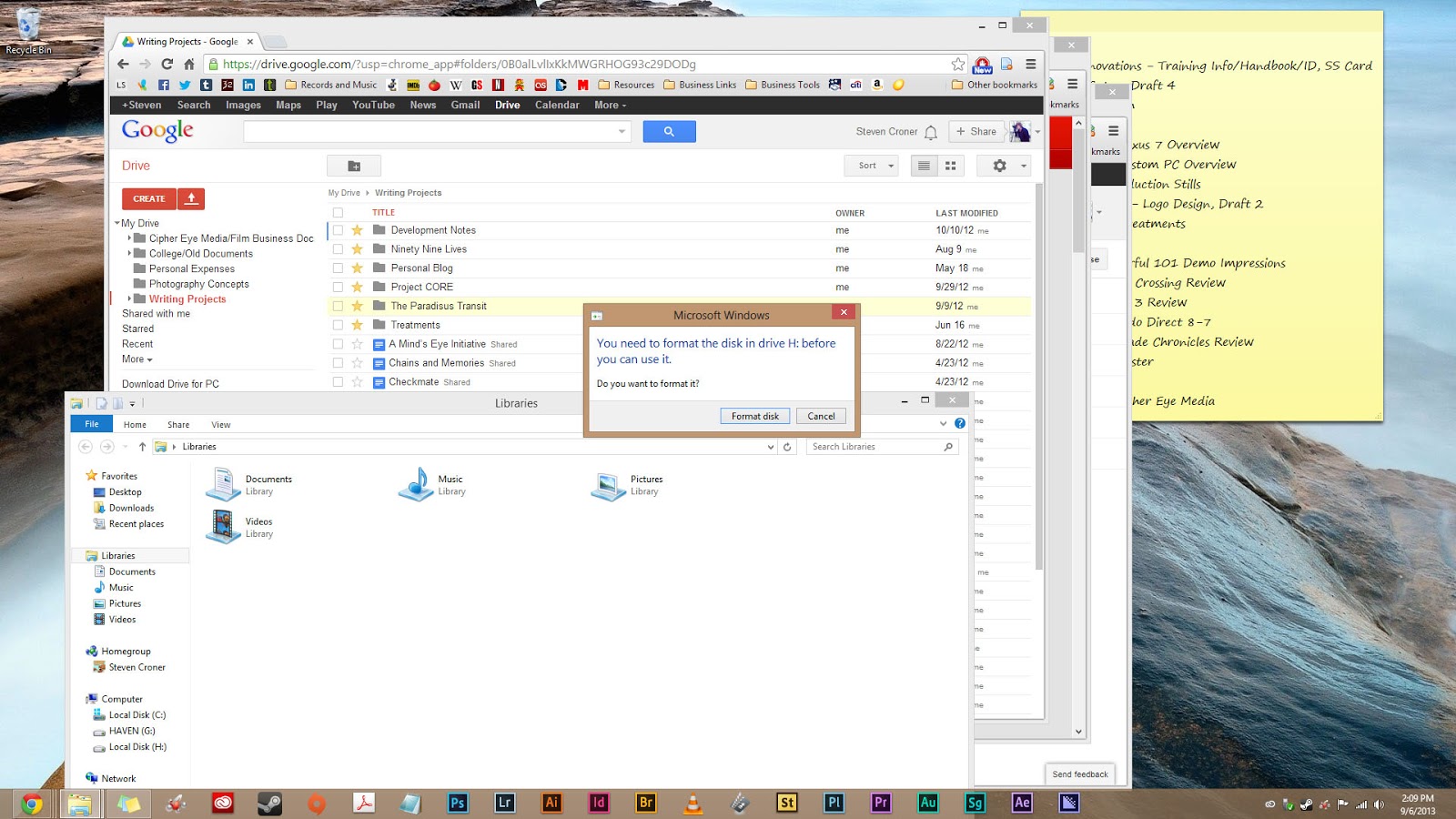
Recently, I experienced some technical difficulties with my Samsung 320GB hard drive, which I was using to transport video files from my laptop to my desktop PC. It seemed as though something had corrupted the hard drive in the transfer process, resulting in this wonderful message:


The system was unable to read the drive, believing that there is nothing on the disk. Oh, ho, ho, ho. Now what? Are those files officially gone? Not quite. Let me run through how recovered my files.

I started by searching for hard drive recovery tools and came across a nifty little program called the Minitool Partition Wizard Home Edition. This software package includes a simple interface that can be helpful for even the most casual users.

Once the program is installed, open the software. You will be given the option to access either the Partition Wizard or Data Recovery. Choose the Data Recovery option.

And...what's this? It will only recover 2GB of data, unless you pay for the software?! Yeah, this happens. Lesson number one: always watch out for software that says its "free", but once installed, limits what you can do with the software, unless you purchase the "full" version. It'll happen more than you think, so just do some thorough research and look for the hidden fees and limitations.

So, after doing some further research, I found a free version that provides a FULL recovery without paying any of your hard-earned cash. Recuva is a free software package designed for data recovery. The application can be downloaded here. On the software page, hit the big green download button. From there it will take you to the next page. Obviously, you want select the free software bundle (unless you feel like giving them your money). Select where you want to download the software from. I just chose Piriform, since they developed the software. From there, the download should automatically start. If not, you can click on the big green download button to start it. Make sure you don't have any Firewalls in place that are preventing the download from opening. Select the destination of the file and let it download.

Once complete, open the installer to begin software installation process. Once the installation is complete, allow the application to open. A recovery wizard is the first to appear. If your hard drive is completely unresponsive, then the wizard will be of little use. Go ahead and click 'Cancel' to navigate to the main recovery screen. Select your faulty hard drive from the drop-down menu and scan the drive for the missing files.


Once the software has finished scanning the hard drive and assessing the damage, a list of files should appear below the drop-down menu. They should be the files that you currently cannot access on your hard drive. Click the check box next to 'Filename' to select all the files and click the 'Recover' button. You will then need to select a destination on your computer to copy the files. The copying process will begin and may take a while, depending how much data is being recovered.
It's also worth noting that this procedure is done for a hard drive that has irreversible damage to it and cannot be accessed in its current state (with the data on it). There may be a quicker fix for a hard drive that suddenly decides to behave badly but can easily be adjusted to do its job. Google is your best friend. In any case, always consult the Google gods for the best solutions and don't always believe that the first result is the best solutions. Research a couple of methods before deciding on the best solution. This goes for any hardware/software recovery. 

If it turns out that it is an issue of hard drive REPAIR and not recovery (recovery would be for worst case scenarios), I would recommend a program called SeaTools. This allows you to check the specified hard drive and attempt to repair bad sectors of the disk. By clicking the 'Downloads' tab, you can download the program for free. After installation, you can do a simple check for errors (the interface is pretty self explanatory). If a problem occurs, the software will recommend that you run a 'Long Generic' test to repair the bad sectors. Select 'Long Generic' from the drop-down menu, then press F8 to begin the scan/fix. Once again, the scan will take a while, if there is a large amount of data on the hard drive. Be patient. Recovering those important, irreplaceable files will be worth the wait. 

If it seems like a problem beyond repair (such as in my case), then you can shell out the money to have a professional recover the drive, attempt to fix the physical components yourself (not recommended), or try the initial recovery method mentioned above (or use similar recovery software to Recuva). Hopefully, this will help for any future scenarios. Hard drive/flash failure happens, so it's important to know what to do in that situation. Most importantly, always backup your necessities onto another hard drive, so you don't have to go through the recovery process in the first place!


Wednesday, September 11, 2013

GoPro Studio 2.0 Now Available

Though not a personal update per say, I do own a GoPro Hero 3, so to hear the announcement that GoPro had just released an update for their studio software, I was rather giddy. I haven't had a chance to test the software myself, but from what I've read, it is exponentially better than the previous version, which has gotten quite a few complaints.


I guess you could say that the GoPro developers actually listened to their end-users and made the requested changes to their editing software. Hooray for the power of listening! While the software package isn't anything special to begin with, it provides the tools that are necessary for some quick cutting and publishing of GoPro footage.


The software includes templates, which allow the user to drop their own footage in, automatically syncing the footage with the template music and effects. This is perfect for somebody looking to make something a little more professional without spending all that time to do it. Of course, this process still requires the user to review and select the footage they want to drag and drop in, but the process is still rather simple.

Now, if you have the time and the editing skills, I would still recommend using your choice of higher-end editing software to cut together your GoPro videos. However, if you don't have the required time or skill, then I would recommend using the GoPro Studio 2.0 for quick editing and a decent looking end-product. I'll check out the software in its entirety and possibly post some of my footage with the use of the software. Check back soon!

SOURCE: http://gizmodo.com/gopro-studio-2-0-hands-on-easier-awesomer-videos-upd-512879804

Thursday, September 5, 2013

Observations and Changes


Well, it's unfortunate that August has been plagued with so many technical issues, because I had some really big plans. The end of July rolling into the next month saw the breakdown of many devices that were necessary for productivity. Not to mention I had to put everything aside just to dedicate the time towards getting those problems worked out.

Now, it's the beginning of September and it seems that most of the bugs have been worked out of the system...keyword: most. I also have a new job on the way, which means that my schedule will be drastically adjusting to adhere this change. I'm not sure how this will affect the time I normally dedicate to film work. I may have to cut back for the time being, returning to local volunteer film work when I am able to work with my new job on scheduling this time.

Although I might be taking a break, that doesn't necessarily mean that I will not stay active in the film community. I will continue writing in the meantime, working towards my goal of developing an original short film. Unfortunately, it may not begin production until early 2014, but the extra time will work in the film's favor.  I don't want to rush things and run into issues with the writing or filming, so this short hiatus might be more beneficial than hurtful. Check back for more updates, as I add new content to my website and associated accounts (links available on website).

In the meantime, I will continue with non-narrative video work and photography (it helps to keep me sharp in the technical department). Cheers!